
Setting up a merchant account for Amazon, Shopify, or WooCommerce depends on your platform, business model, and where your customers are located. Each platform has different payment infrastructure requirements — and choosing the right merchant account provider determines your transaction fees, settlement speed, fraud protection, and ability to scale globally.
Why Platform Choice Shapes Your Payment Setup
Most new sellers assume payment processing is the same regardless of where they sell. It isn’t. Amazon, Shopify, and WooCommerce each have distinct payment ecosystems, integration requirements, and levels of control they give merchants over their payment infrastructure. Read – Ecommerce Merchant Account Guide
Understanding these differences upfront saves time, prevents costly misconfigurations, and helps you choose a provider that fits how you actually sell — not just how the platform defaults suggest you should.
Key Takeaways: What You’ll Learn From This Guide
1. Shopify, WooCommerce, and Amazon each have distinct payment infrastructure — one setup approach doesn’t fit all three
2. A dedicated merchant account offers better rates and stability than PSP aggregators at higher volumes
3. MyntPay integrates across all major e-commerce platforms with multi-currency support, fast onboarding, and transparent pricing
4. WooCommerce gives the most flexibility but requires more manual configuration and plugin management
5. Amazon Marketplace sellers don’t need a merchant account for Amazon orders, but multichannel sellers do for their own sites
6. PCI DSS scope is minimized when using hosted payment pages — the standard approach across all three platforms
7. Always test payment integration in sandbox mode before accepting live transactions
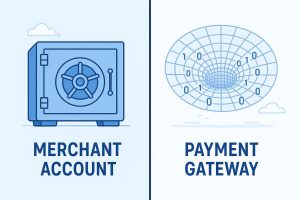
Understanding the Difference: Merchant Account vs. Payment Service Provider
Before diving into platform-specific setup, one distinction matters considerably. A merchant account is a dedicated account with an acquiring bank that holds funds from card transactions before they’re deposited into your business bank account. You receive a unique Merchant ID (MID) and are underwritten individually based on your business type and risk profile.
A payment service provider (PSP) — like Stripe or Square — aggregates thousands of merchants under a single MID. This makes onboarding faster but means your account is subject to the PSP’s risk policies rather than your own underwriting terms. Read – How to Get an E-commerce Merchant Account
For sellers with growing volumes, a dedicated merchant account typically offers better rates, greater stability, and more control. For those just starting, a PSP may be the faster entry point.
Merchant Account Setup for Shopify Sellers
How Shopify Handles Payments
Shopify offers its own native payment solution called Shopify Payments, which is available in select countries. It’s built on Stripe infrastructure and removes transaction fees that Shopify charges when using third-party processors.
However, Shopify Payments isn’t available in every country, doesn’t suit every business type, and gives merchants limited control over their acquiring relationship. For sellers who want a dedicated merchant account, Shopify supports third-party payment gateways through its extensive integration library. Read – Top Payment Gateways for Adult Websites
Setting Up a Third-Party Merchant Account on Shopify
- Choose your merchant account provider — Select a provider that offers a Shopify-compatible payment gateway. MyntPay integrates directly with Shopify, giving sellers a dedicated merchant account with transparent pricing and multi-currency support.
- Apply and complete underwriting — Provide business documentation including company registration, bank details, identity verification, and your website URL. Shopify sellers should ensure their store is live or in a reviewable state before applying.
- Obtain your gateway credentials — Once approved, your provider gives you API keys or gateway credentials.
- Connect within Shopify admin — Navigate to Settings → Payments → Third-party providers, select your gateway, and enter the credentials provided.
- Test transactions before going live — Use sandbox/test mode to confirm the integration is working correctly before processing real payments.
Key Considerations for Shopify Sellers
- Shopify charges an additional transaction fee (0.5%–2% depending on plan) when using third-party gateways — factor this into total cost calculations
- Multi-currency selling requires either a gateway that supports currency conversion or Shopify Markets configuration
- Subscription products require a gateway that supports recurring billing — confirm this before selecting a provider
Unlock Faster International Payment Approvals
Unlock smooth and secure international payments with our platform. Experience faster approvals, easy setup, and comprehensive support for global transactions. Take your business to new markets without delays or complicated processes.
Get Started NowMerchant Account Setup for WooCommerce Sellers
How WooCommerce Handles Payments
WooCommerce is an open-source plugin for WordPress, which means payment processing is entirely handled through plugins and third-party integrations. There is no native payment processor — everything connects via a payment gateway plugin. Read – The Impact of Chargebacks in Adult Payment Processing
This gives WooCommerce sellers more flexibility than most other platforms, but also more responsibility for configuration and maintenance.
Setting Up a Merchant Account on WooCommerce
- Select a payment gateway plugin — Most merchant account providers offer a dedicated WooCommerce plugin. MyntPay provides a WooCommerce-compatible gateway plugin that handles both standard and recurring payments.
- Install and activate the plugin — From your WordPress dashboard, go to Plugins → Add New, search for your provider’s plugin, and install it.
- Enter your merchant credentials — The plugin settings page will ask for your API keys or merchant ID, which your provider supplies after account approval.
- Configure payment settings — Set accepted currencies, enable or disable specific payment methods (cards, bank transfers, digital wallets), and configure order status automations.
- Enable SSL — WooCommerce requires an SSL certificate on your domain for any payment processing. Most hosting providers offer this free via Let’s Encrypt.
- Test in sandbox mode — WooCommerce’s built-in order system allows test purchases. Run several test transactions before accepting live payments.
Key Considerations for WooCommerce Sellers
- Plugin compatibility with your WordPress and WooCommerce version should be confirmed before installation
- WooCommerce Subscriptions (a separate paid extension) is required for recurring billing — ensure your gateway supports it
- Hosting quality affects checkout performance; a slow server can increase cart abandonment regardless of payment setup
- PCI DSS scope depends on how card data flows through your site — hosted payment pages reduce your compliance obligations significantly
Merchant Account Setup for Amazon Sellers
How Amazon Handles Payments
Amazon’s payment processing is fundamentally different from Shopify and WooCommerce. For sellers on Amazon Marketplace, Amazon handles all payment processing on the buyer side — customers pay Amazon directly, and Amazon disburses funds to sellers on a set schedule (typically every 14 days).
This means Amazon Marketplace sellers don’t need a traditional merchant account for processing orders through Amazon itself. Read – How Stripe, PayPal & CCBill Are Navigating Adult Industry Payments
When Amazon Sellers Do Need a Merchant Account
Despite Amazon handling marketplace payments, sellers need their own merchant account in several scenarios:
- Amazon Brand Registry with an external website — Sellers driving traffic to their own site alongside Amazon need independent payment processing
- Amazon Handmade or Custom products with direct sales — Some sellers operate multichannel and need payment processing outside of Amazon
- Selling through Amazon Pay on external sites — Amazon Pay can be integrated into external websites, but the merchant still needs their own business bank account and identity verification
- International disbursements — Sellers receiving payments from Amazon in foreign currencies often use currency conversion services to optimize exchange rates
What Amazon Sellers Should Set Up
For multichannel Amazon sellers operating their own website alongside their marketplace store, a full merchant account setup — as described in the WooCommerce or Shopify sections above — applies to the independent sales channel. Read – Future Trends in Adult Payment Processing.
MyntPay works well for multichannel sellers because a single account can handle payments across multiple sales channels, reducing the number of provider relationships and reconciliation complexity.
Unlock Faster International Payment Approvals
Unlock smooth and secure international payments with our platform. Experience faster approvals, easy setup, and comprehensive support for global transactions. Take your business to new markets without delays or complicated processes.
Get Started NowChoosing the Right Merchant Account Provider Across All Three Platforms
Not all merchant account providers integrate cleanly with every platform. Here’s what to evaluate regardless of which platform you use.
Integration Compatibility
Confirm the provider has a tested, maintained integration for your specific platform and version. An integration that worked two years ago may not be compatible with current platform updates.
Multi-Currency Support
If you sell internationally — across Amazon marketplaces, Shopify international stores, or WooCommerce with global shipping — your provider needs to support multiple currencies with competitive conversion rates.
Recurring Billing Support
Subscription boxes, software, membership sites, and replenishment products all require recurring billing. Not all merchant accounts support this natively, and some charge additional fees for the feature.
Settlement Speed
How quickly funds move from processed transactions to your business bank account affects cash flow. Settlement times range from same-day to 5+ business days depending on the provider and your risk profile.
Fraud and Chargeback Tools
E-commerce platforms attract a disproportionate share of card-not-present fraud. Your provider should offer 3D Secure support, fraud scoring, and chargeback alerts as standard — not as expensive add-ons.
Platform vs. Provider Comparison
| Feature | Shopify Payments | WooCommerce (Plugin) | Amazon Pay | MyntPay (All Platforms) |
| Dedicated Merchant ID | No (PSP) | Depends on provider | No | ✅ Yes |
| Multi-currency | ✅ Limited | Depends on provider | ✅ | ✅ 100+ currencies |
| Recurring billing | ✅ | Via extension | Limited | ✅ |
| Cross-platform use | Shopify only | WooCommerce only | External sites | ✅ All platforms |
| Transparent pricing | Flat rate | Varies | Varies | ✅ |
| Fast onboarding | ✅ | Varies | ✅ | ✅ 24–48 hours |
PCI DSS Compliance Across E-Commerce Platforms
Every seller processing card payments — regardless of platform — carries PCI DSS obligations. The scope of those obligations depends significantly on how card data flows through your checkout.
Hosted payment pages (where customers enter card details on your provider’s page, not your own) offer the lowest PCI scope. Most merchants qualify for SAQ A, the simplest self-assessment questionnaire.
Inline checkout forms (where card fields appear directly on your website) carry higher PCI scope and require more rigorous compliance work.
Shopify Payments and most third-party gateways use hosted or iFrame-based approaches that keep PCI scope minimal for merchants. WooCommerce sellers should confirm how their chosen plugin handles card data before going live. Full guidance on PCI DSS compliance levels and self-assessment questionnaires is available through the PCI Security Standards Council at pcisecuritystandards.org.
Common Setup Mistakes to Avoid
Sellers across all three platforms tend to make a handful of avoidable mistakes during payment setup:
- Not testing in sandbox mode before going live, resulting in discovered configuration errors during real customer transactions
- Ignoring currency settings, causing customers to see prices in the wrong currency or be charged unexpected conversion fees
- Choosing a provider without checking platform compatibility, then discovering the integration doesn’t work after account approval
- Not enabling 3D Secure, leaving the merchant liable for chargebacks on disputed transactions
- Underestimating total fees, by focusing only on transaction rates and missing monthly fees, currency conversion margins, and chargeback costs
Unlock Faster International Payment Approvals
Unlock smooth and secure international payments with our platform. Experience faster approvals, easy setup, and comprehensive support for global transactions. Take your business to new markets without delays or complicated processes.
Get Started NowFrequently Asked Questions
Q.1 Do I need a merchant account for Shopify?
Not necessarily. Shopify Payments handles payment processing natively in supported countries. For unsupported countries, restricted business types, or merchants wanting a dedicated merchant account, third-party providers like MyntPay integrate directly with Shopify.
Q.2 Can I use the same merchant account for Shopify and WooCommerce?
Yes, if your provider supports both platforms. MyntPay offers integrations for multiple e-commerce platforms, allowing sellers to manage payments across channels from a single account.
Q.3 Does Amazon handle payment processing for sellers?
For Amazon Marketplace sales, yes — Amazon processes buyer payments and disburses funds to sellers on a set schedule. Sellers only need their own merchant account if they operate an independent website or multichannel store outside of Amazon.
Q.4 What is the difference between Shopify Payments and a merchant account?
Shopify Payments is a payment service provider that aggregates merchants — you don’t get an individual merchant ID. A dedicated merchant account gives you your own MID, typically better rates at higher volumes, and a direct relationship with an acquiring bank.
Q.5 How long does merchant account setup take for e-commerce sellers?
Setup time varies by provider. MyntPay completes onboarding within 24–48 hours for standard e-commerce businesses. More complex business types or higher-risk categories may take longer depending on the documentation review.
Q.6 What documents do I need to apply for a merchant account as an e-commerce seller?
Typically: government-issued ID, business registration documents, bank account details, your website URL, and a description of your products or services. Some providers also request recent bank statements for volume verification.
Q.7 Do WooCommerce sellers need a separate plugin for payment processing?
Yes. WooCommerce requires a payment gateway plugin to connect with a merchant account or PSP. Most providers offer dedicated WooCommerce plugins, and MyntPay provides a compatible plugin for straightforward integration.
Q.8 Is PCI DSS compliance required for Shopify and WooCommerce sellers?
Yes, for any seller accepting card payments. The specific compliance level (SAQ type) depends on how card data flows through your checkout. Using hosted or iFrame payment pages keeps PCI scope minimal for most e-commerce merchants.
Q.9 Can I accept international payments on Shopify and WooCommerce?
Yes, provided your merchant account supports multi-currency processing. MyntPay supports 100+ currencies, making cross-border selling accessible for both Shopify and WooCommerce stores from the point of account setup.
Q.10 What should I do if my payment gateway stops working after a platform update?
Contact your gateway provider immediately and check whether a plugin or integration update is available. Keeping gateway plugins updated and monitoring release notes from both your platform and provider prevents most compatibility issues.
References & Resources
- PCI Security Standards Council — pcisecuritystandards.org — PCI DSS compliance standards, SAQ types, and merchant guidance for e-commerce sellers
- Shopify Help Center — help.shopify.com — Official documentation on payment gateways, Shopify Payments, and third-party integrations
- WooCommerce Documentation — woocommerce.com/documentation — Official setup guides for payment gateways and plugin integration
- Amazon Seller Central Help — sellercentral.amazon.com/help — Official guidance on Amazon payment disbursements and seller account setup
- Visa Merchant Guidelines — usa.visa.com/support/merchant — Card network rules applicable to e-commerce merchants
- Mastercard Business Rules — mastercard.us/en-us/business — Operating regulations for merchants accepting Mastercard payments
- Financial Conduct Authority (FCA) — fca.org.uk — UK regulatory framework for payment service providers
- European Banking Authority (EBA) — eba.europa.eu — EU PSD2 regulations applicable to cross-border e-commerce payments
- NACHA — nacha.org — ACH payment standards relevant to bank transfer options in WooCommerce and Shopify
If you’re setting up or migrating payment processing across Shopify, WooCommerce, or Amazon, the most important step is confirming that your chosen provider integrates reliably with your specific platform version — before applying. A small amount of due diligence upfront prevents significant disruption later.
Setting up a merchant account for Shopify, WooCommerce, or Amazon depends on your platform. Shopify and WooCommerce require a third-party gateway like MyntPay, while Amazon handles marketplace payments directly. Multichannel sellers need their own merchant account for sales outside Amazon.